Concept project2026AccessibilityRGAA
Can I complete my request on my own, whatever my disability?
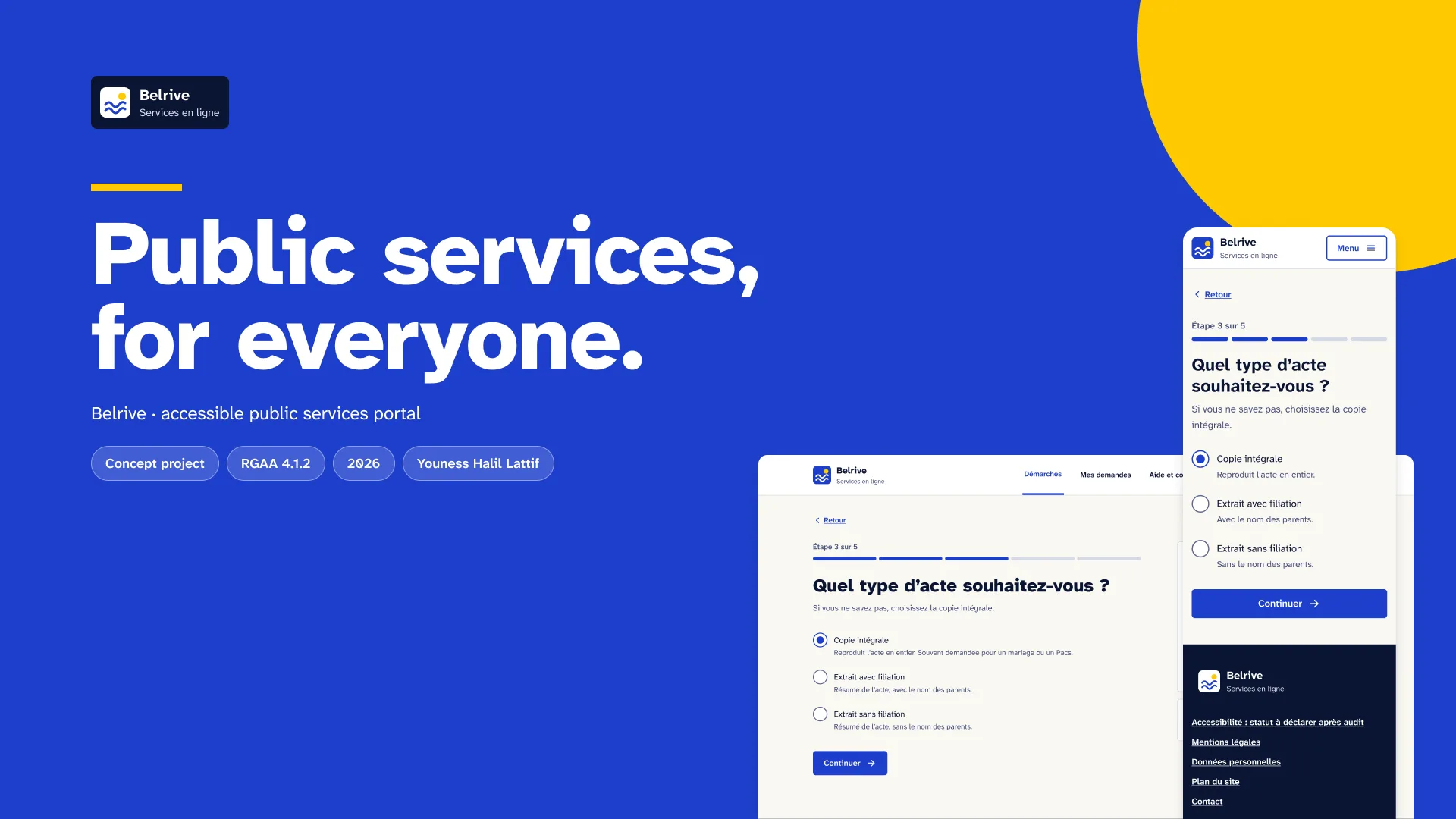
Belrive, an online services portal for a fictional French town, designed by starting from accessibility rather than checking it at the end.
Summary
- The problem. Essential online public services in France remain largely non-compliant with the RGAA. The people affected go to a counter or ask a relative.
- The key decision. One question per page, errors explained in text, and two display modes built as Figma variable modes.
- Where the outcome stands. Not measured. 16 screens, 23 components, contrasts calculated. No conformance statement: a mockup cannot be compliant.
Context and users
Belrive is a fictional French town. Its portal lets residents complete administrative requests online. The reference request is a birth certificate. It is short, frequent and asks for precise information.
The intended users are all residents. Among them are blind or partially sighted people, slow readers, and people who do not use a mouse. There are also residents who are uncomfortable with digital tools. Insee counted 7% of people aged 16 to 74 as digitally excluded in 2025.
These profiles are working hypotheses. No interviews were conducted. Camille Martin, the name shown on the screens, is an example.
The French state design system, the DSFR, is reserved for state services. A town cannot use it. Belrive therefore has its own system, built to the same standards.
Constraints
- Business. The portal must cover the request, its tracking and display preferences. The journey must lose nobody between the first question and the confirmation.
- Technical. Text must scale to 200% without breaking the layout. Both contrast modes must share the same components.
- Accessibility. RGAA 4.1.2 is the reference standard, with its 106 criteria and 13 themes. Information must never rely on colour alone. Focus must stay visible on every background.
- Time. One month, alongside my other work. Scope was limited to one complete request and its supporting screens.
Research
Desk research, on public sources consulted on 4 October 2026. Three findings guided the project.
The legal framework is strict and tightening. Article 47 of the 2005 law requires an accessibility statement, a multi-year plan and a notice on the home page. Arcom enforces it, with fines of up to 50,000 euros. The European Accessibility Act has applied since 28 June 2025.
The gap with reality is documented. In January 2026, 16 of the 244 essential online services were fully compliant, according to the Cour des comptes.
Proven patterns exist. GOV.UK and the DSFR document the single question per page, the error summary and the check page. I took them as references, without copying them. The DITP plain language method guided the wording of labels.
- RGAA 4.1.2, DINUM, current standard. RGAA 5 announced for late 2026, DINUM, 4 March 2026.
- Law 2005-102, article 47, and decree 2019-768 of 24 July 2019.
- Article 47-1, ordinance 2023-859 of 6 September 2023: enforcement by Arcom.
- European Accessibility Act, applicable since 28 June 2025.
- Cour des comptes, 18 June 2026: 16 of 244 essential services fully compliant in January 2026.
- Insee Focus 376, 19 February 2026: digital exclusion, 7% of people aged 16 to 74 in 2025.
- DITP, plain language method, ISO 24495-1:2023.
- GOV.UK Design System and DSFR: form patterns, cited as references.
Options explored
- Option 1: one long form on a single page. Every question visible at once, one submit button. Rejected: the cognitive load is high for a slow reader. Errors cluster too far from the fields they concern.
- Option 2: errors shown by colour and an icon. Red border and warning pictogram, no explanatory text. Rejected: it breaks the “never colour alone” rule. A screen reader has nothing to read, and the user does not know what to fix.
- Option 3: a dark mode instead of enhanced contrast. Dark mode is expected and reassuring. Rejected: the documented need is contrast, not background colour. A dark background does not improve legibility by itself.
Key decisions
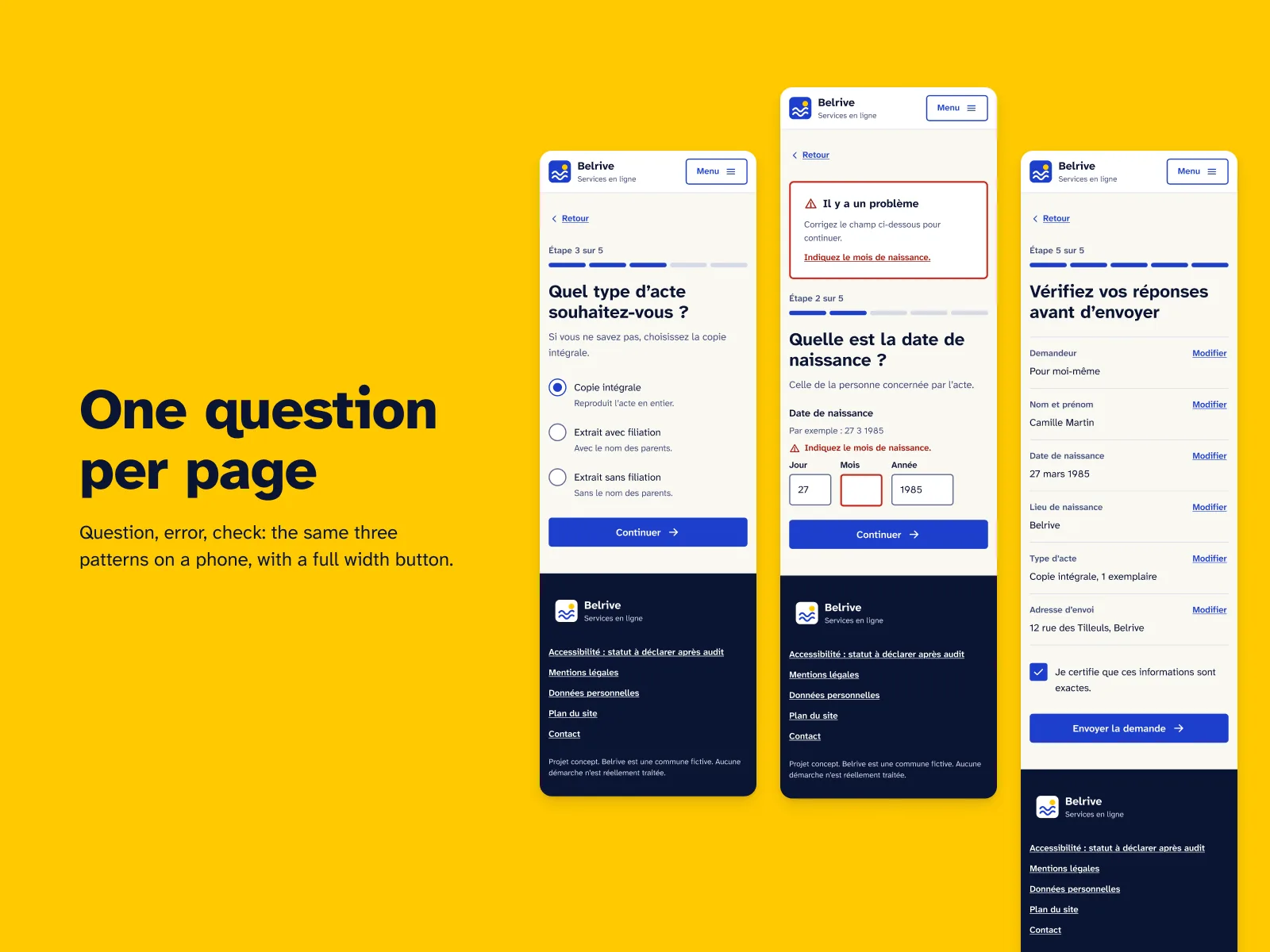
1. One question per page, then a check page
The screen. The birth certificate request runs as a sequence of screens. Each screen asks one question: type of certificate, date, identity. A check page recaps the answers, with a “Change” link on each line. The confirmation closes the journey.
The rule. One page, one question, one button. Every correction goes through the check page, never through a forced step back.
The trade-off. The journey has more pages. It takes more clicks than a single form. I accepted that cost for clarity.
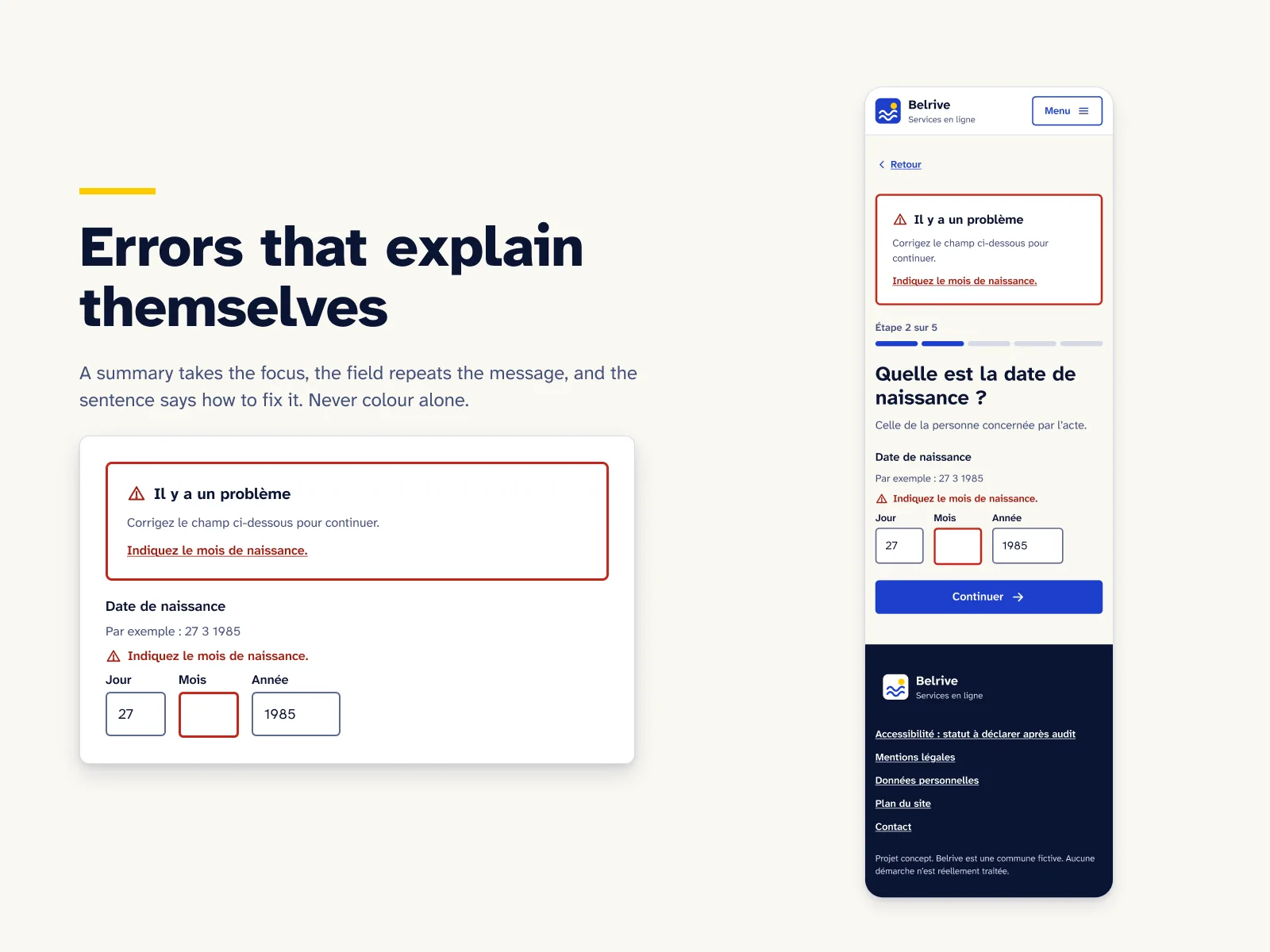
2. Errors in two places, in text
The screen. The date question, in its error state. A summary at the top of the page lists the problems and links to the fields. Under the field, a message says what to fix and how, in plain language.
The rule. An error is always readable as text, never through colour or an icon alone. The summary receives focus so that assistive technology announces it.
The trade-off. The message appears twice on the page. It is a deliberate redundancy, and it costs vertical space.
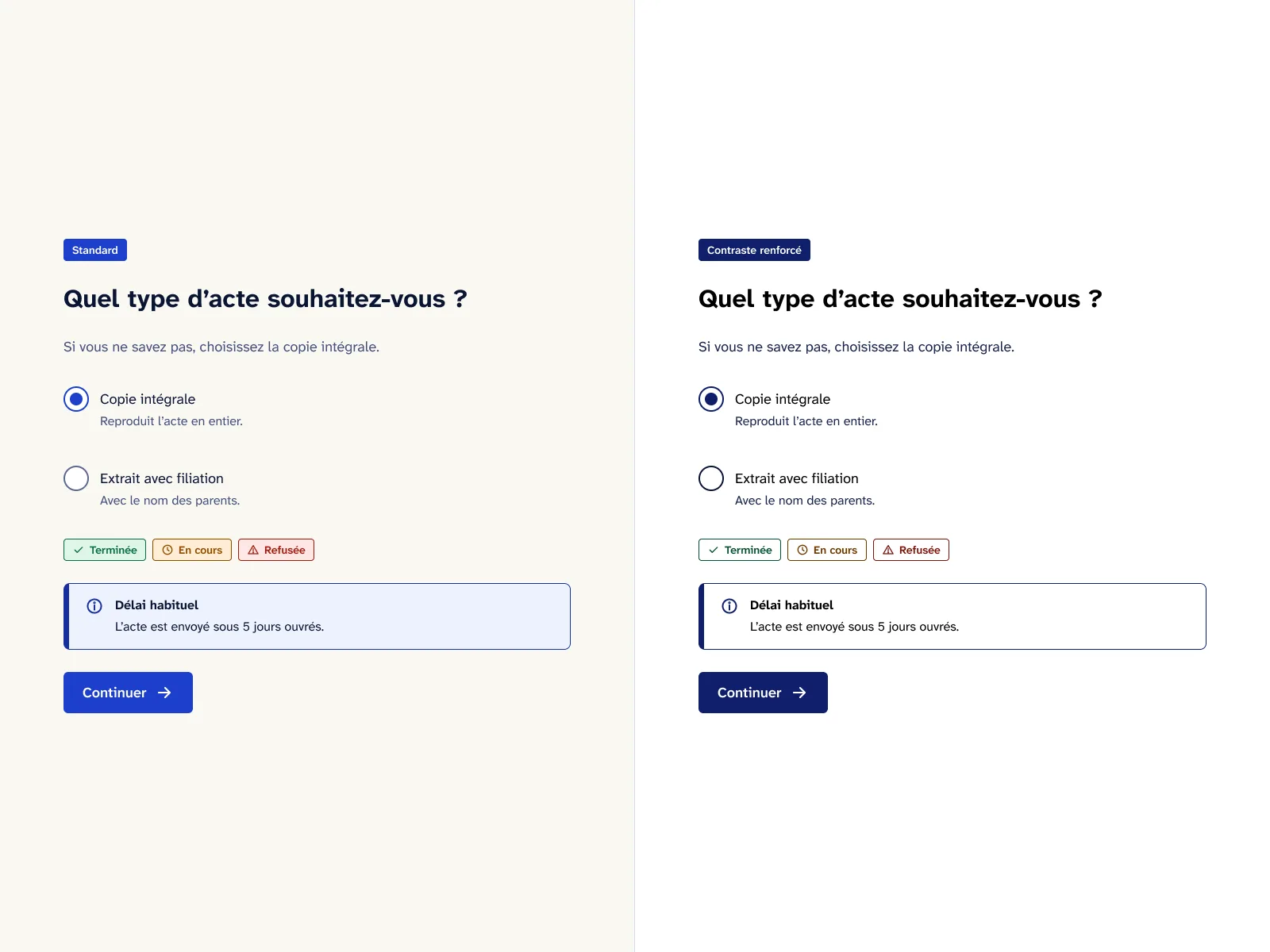
3. Enhanced contrast and 200% text as variable modes
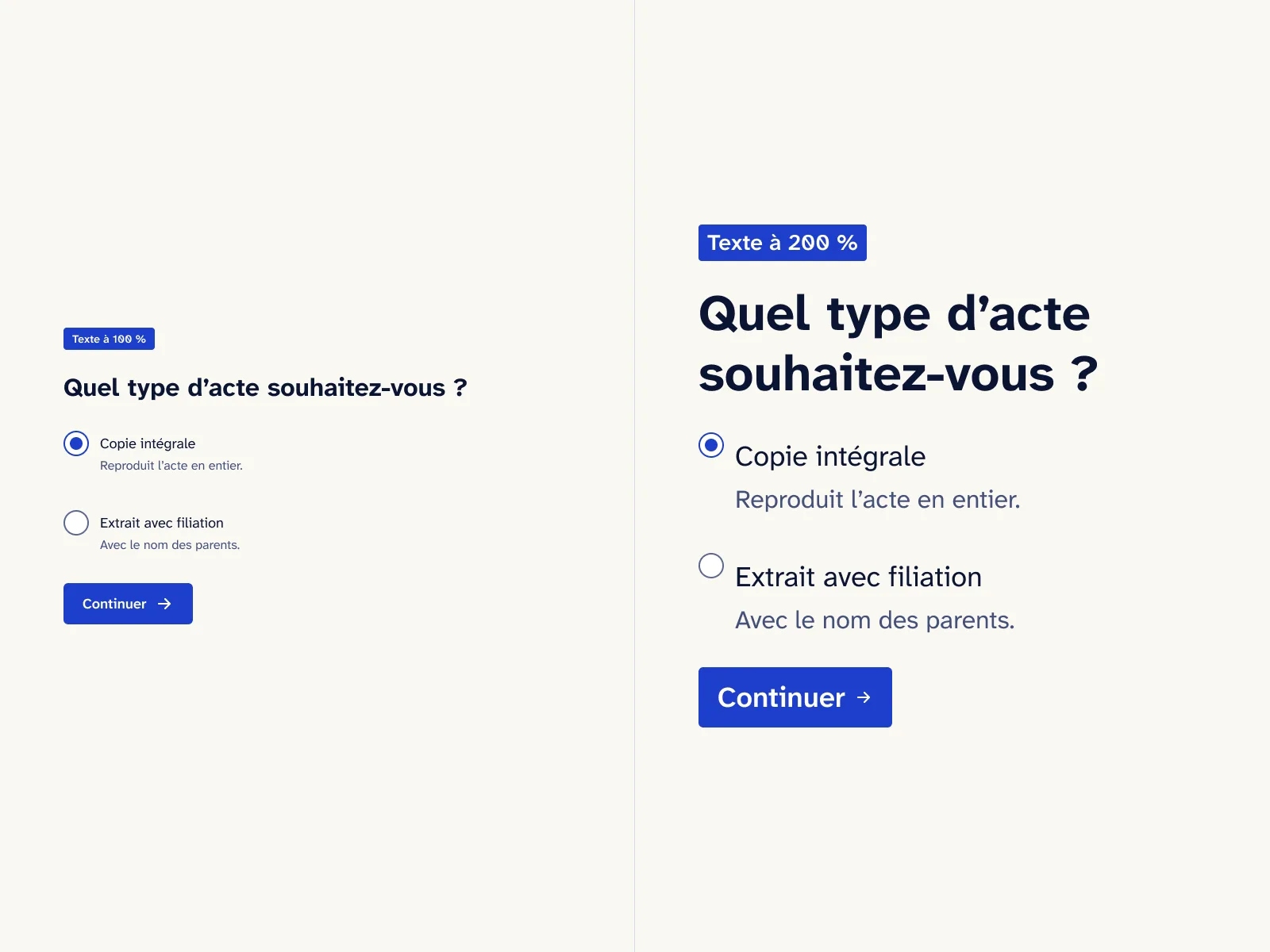
The screen. Display preferences offer an “Enhanced contrast” mode and a text size setting. Two question screens show the result: one in enhanced contrast, one with text at 200%.
The rule. Colours and text sizes are Figma variables. The Color collection has two modes, Standard and Enhanced contrast. The Text size collection has two modes, 100% and 200%. Every screen is checked in all four combinations. The weakest text contrast pair is 5.3:1 in standard and 9.7:1 in enhanced contrast.
The trade-off. The system is heavier to maintain. Every new component must be tested in every mode before it enters the library.
The rest of the system follows the same logic. Atkinson Hyperlegible Next typography, underlined links, 12 two-tone vector pictograms. No 3D, no glass under text. The focus ring is double, yellow inside and dark outside, so it stays legible on every background. Designed in Figma with an AI-augmented workflow: Claude connected to Figma through MCP, directed and reviewed by the designer.
Outcome
Not measured. Metric: rate of requests completed without help, by type of assistive technology. Method: moderated test with a screen reader and keyboard navigation, then an RGAA audit of the site once built.
Figures counted by script in the Figma file, 4 October 2026. The footer of every screen reads “Accessibility: status to be declared after audit”.
What I learned
Starting from accessibility changes the order of decisions. Contrast, focus and error text are settled before the brand colour, not after. Variable modes made that check systematic: a screen that breaks at 200% shows immediately.
I also learned the limit of a mockup. It can show calculated contrasts and cited criteria. It cannot be compliant. Conformance is declared after an audit of a real site, with assistive technologies.
Transparency
- ClientNone. Fictional town, personal project, sample data.
- ResearchDesk research, on public sources dated 4 October 2026. No interviews.
- User testingNot carried out. No testing with assistive technologies, no audit of a real site.
- AccessibilityContrasts calculated pair by pair. Neither an audit nor a conformance statement: a mockup cannot be “RGAA compliant”.
What AI did, what I decided
The AI
- Generated the screen variants in both modes, from the variables.
- Wrote the counting and contrast calculation scripts.
- Pre-filled the accessibility notes on the screens.
Me
- The one question per page journey and the check page.
- The rule of errors in text, in two places.
- Checking every RGAA criterion number against the standard.
- Reviewing every screen, in every mode.
 Next projectVigieAI agent supervision console