Concept project2026SaaSAI
Who refunded this customer, the AI agent or a person?
A supervision console where colour says who acted, and where a person keeps the final say on every refund.
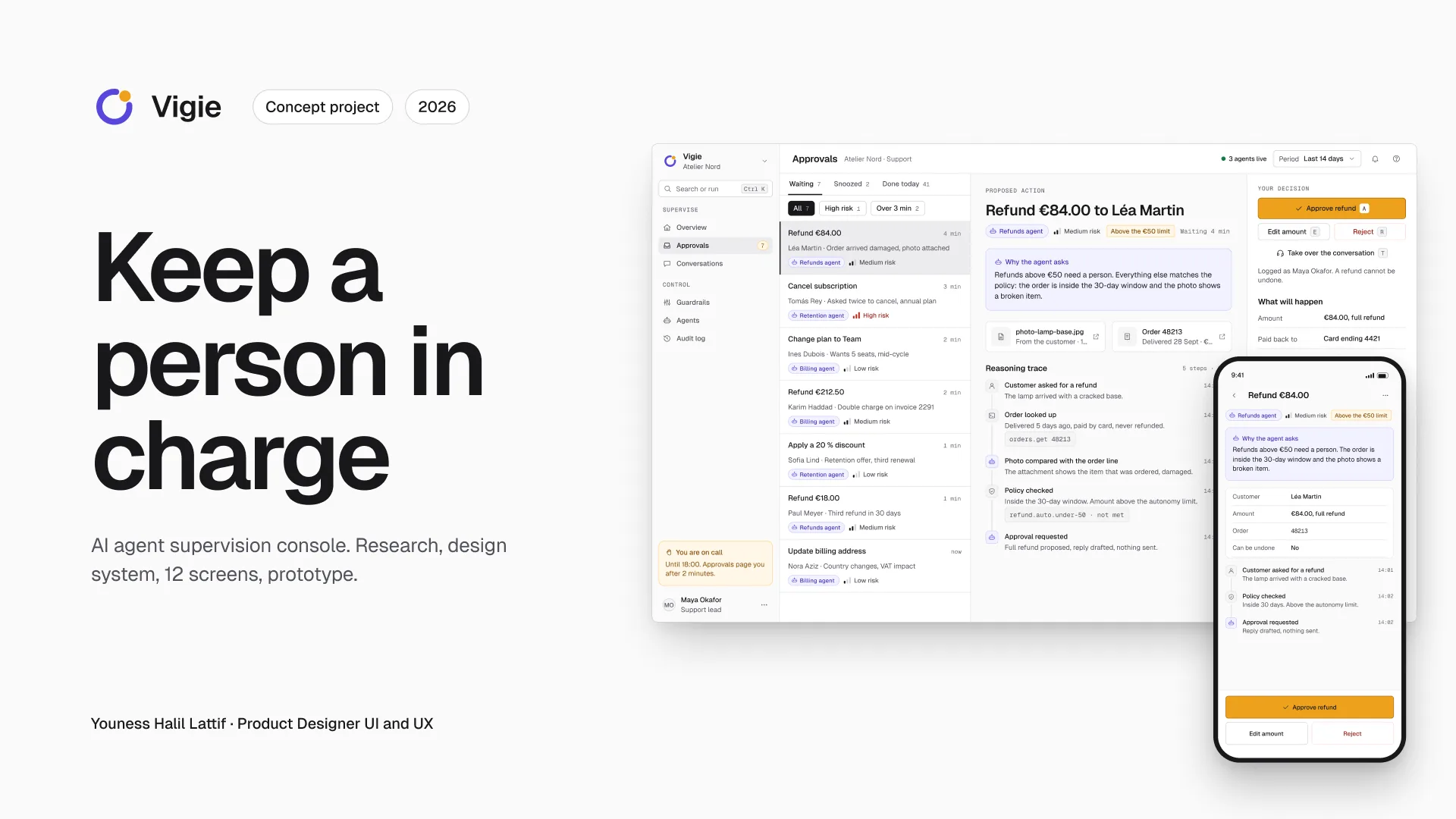
Summary
- The problem. AI agents refund, change plans or cancel on behalf of a support team. Afterwards, nobody can tell who decided what.
- The key decision. Colour names the actor and nothing else: iris for the AI agent, amber for a person, grey for the system. Autonomy is set per action, on three levels.
- The state of the outcome. Not measured. Twelve screens prototyped, contrasts calculated, test plan written but not run.
Context and users
Vigie is a B2B SaaS console for a support team that supervises AI agents. Those agents act on a customer account: refund, change a plan, cancel. The example company, Atelier Nord, is fictional. Its data stays consistent from one screen to the next: 1,284 plus 228 make 1,512 requests. Of 480 refunds, 412 went through automatically, which is 86%.
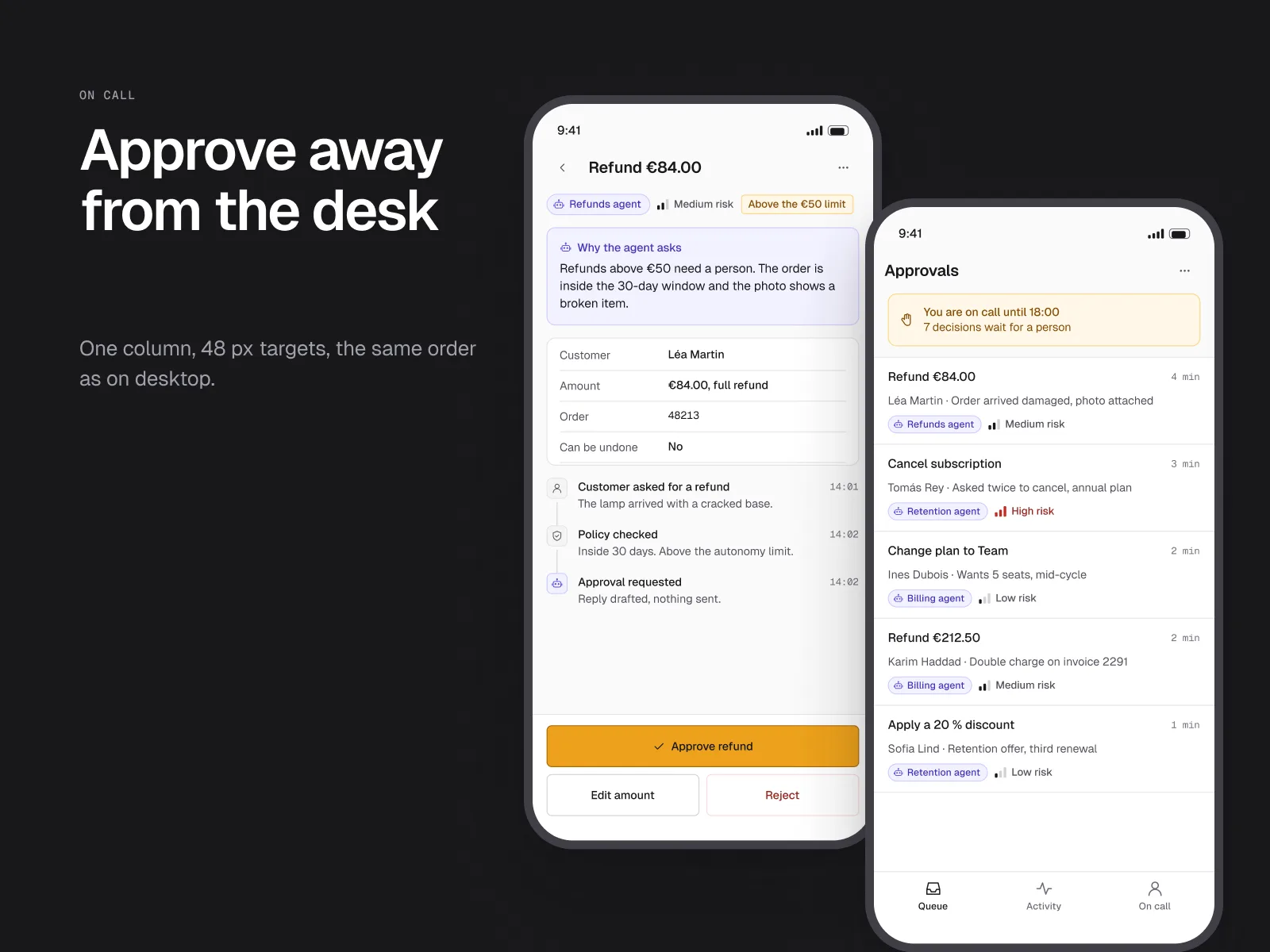
Three proto-personas, stated as hypotheses, cover the roles of the team. Four jobs and six principles follow from them, with no interview to check them. The most demanding case is on-call duty. A person must be able to approve from a phone without losing the reason behind the request.
Constraints
- Business. A refund cannot be taken back. A person must be able to take over at any moment, including on call.
- Technical. One design system of 147 variables. Dark mode is a variable mode, not a second design. Two formats: desktop 1440 × 900 and mobile 390 × 844.
- Accessibility. Never colour alone: always an icon and a label. Targets of 28 px on desktop, 44 px on mobile, 48 px for decisions.
- Time. Personal project carried out in October 2026, with no client and no team. Scope held to twelve screens.
Research
The research is desk research, with sources reread on 3 and 4 October 2026. Three tensions stand out. Gartner predicts 80% of common requests resolved by agentic AI without human intervention by 2029. Yet 64% of customers surveyed by Gartner would prefer companies not to use AI in customer service. Gartner also predicts that over 40% of agentic AI projects will be cancelled by the end of 2027.
Two texts frame accountability: the Moffatt v. Air Canada decision of 14 February 2024, and Article 50 of the AI Act, applicable since 2 August 2026. Bloomberg reported on 8 May 2025 that Klarna was hiring people for customer service again. I also read, as a visitor, the product pages of Intercom Fin, Decagon and Salesforce Agentforce.
What I take from this: automation moves forward, trust does not follow, accountability stays human. The console must make visible who acted, and let a person decide when it matters.
- Gartner, press release, 5 March 2025: 80% of common requests resolved by agentic AI by 2029, prediction.
- Gartner, survey, 9 July 2024: 64% of customers would prefer companies not to use AI in customer service.
- Gartner, 25 June 2025: over 40% of agentic AI projects cancelled by the end of 2027 (prediction).
- European Commission, questions and answers, Article 50 of the AI Act: transparency applicable since 2 August 2026.
- Moffatt v. Air Canada, 2024 BCCRT 149, 14 February 2024.
- Bloomberg, 8 May 2025: Klarna hires people for customer service again.
- Product pages of Intercom Fin, Decagon and Salesforce Agentforce, read as a visitor.
Options explored
Three options set aside on design criteria, without user testing.
- Option 1: an on/off switch for autonomy. One toggle per agent, on or off. Set aside: it says neither the limit nor the action concerned. A small refund and a cancellation do not call for the same trust.
- Option 2: one colour per state. Green approved, red refused, as in many tools. Set aside: colour had to name the actor and nothing else. Two colour codes on one screen would have blurred the reading.
- Option 3: a dark version by default, the Vigie 1 pilot. Dark as the reference design. Set aside: dense data was harder to read. Dark became a variable mode.
Key decisions
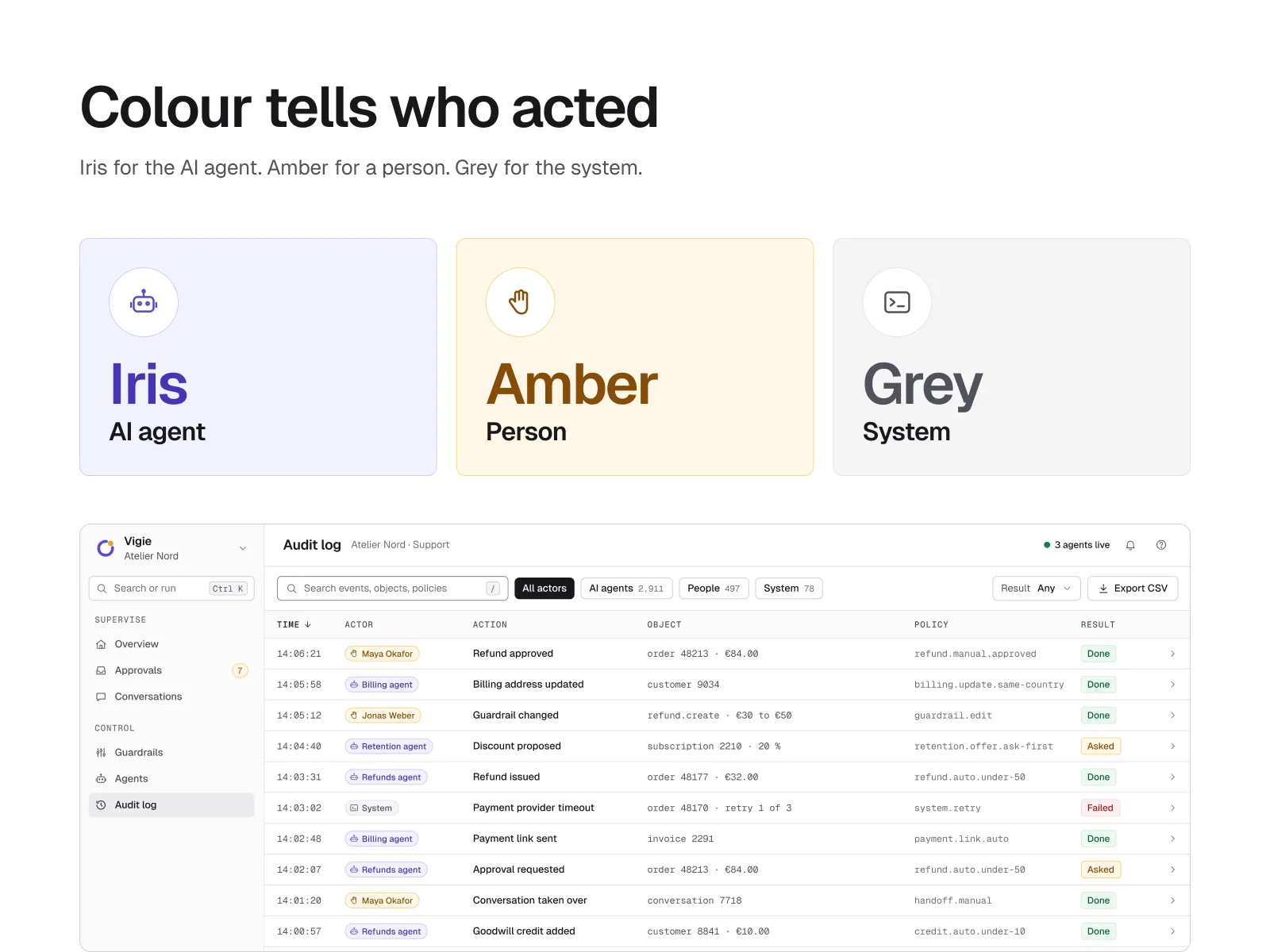
1. Colour says who acted
The screen. The Audit log and each Audit entry. Every row carries an actor: iris for the AI agent, amber for a person, grey for the system. Always with an icon and a label.
The rule. The interface stays ink on paper, black primary button included. Iris and amber never mean anything other than an actor.
The trade-off. The interface gives up the green and red codes support teams know. You read one more word. In exchange, the title question is answered at a glance.
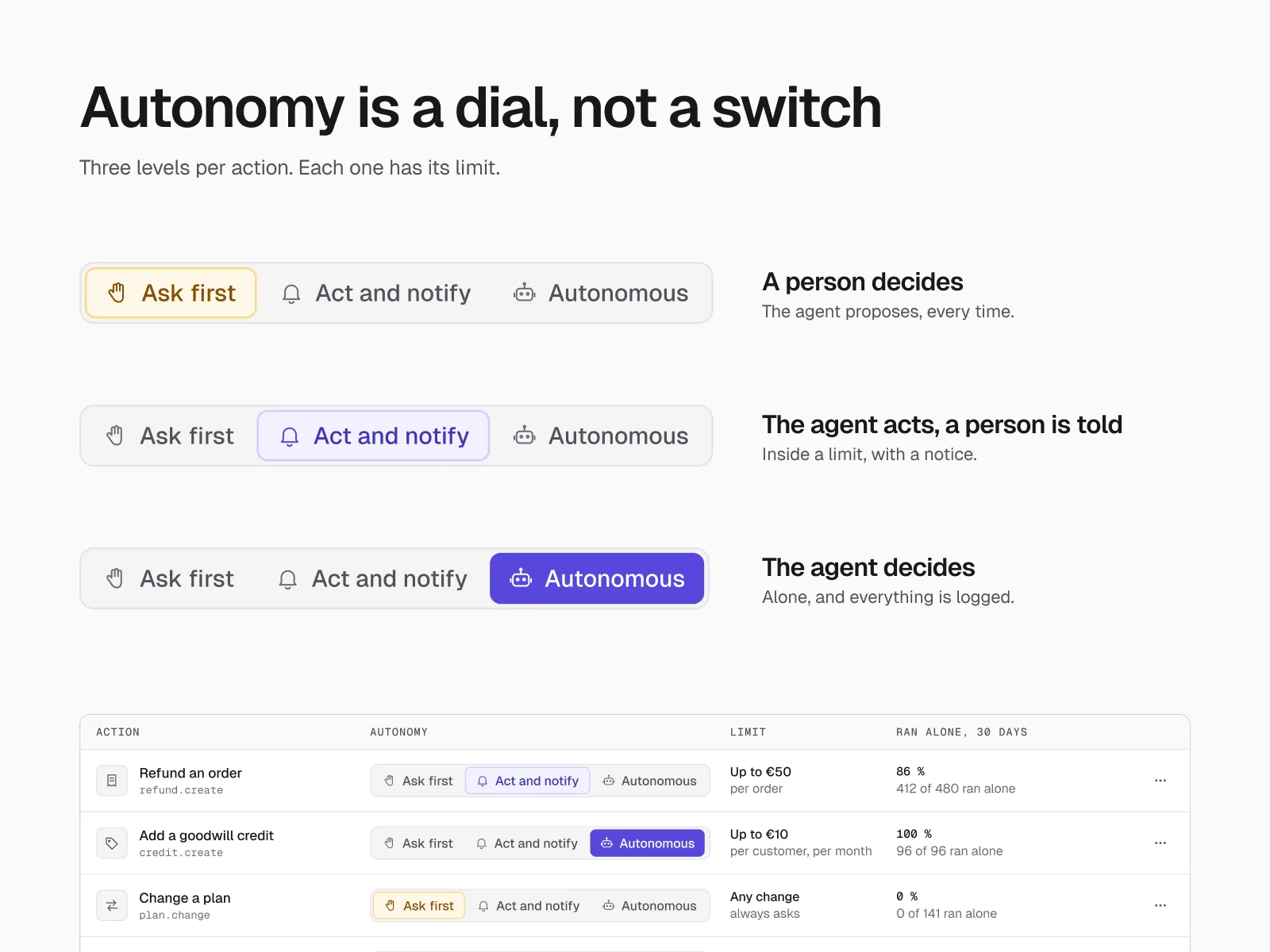
2. Autonomy is set action by action
The screen. Guardrails and the Raise a limit dialogue. Each action has its own three-level slider: Ask first, Act and notify, Autonomous. Each action has its own limit. Before any increase, a 30-day simulation is shown.
The rule. The irreversible is said before the click. The dialogue shows “A refund cannot be undone” before moving up a level.
The trade-off. Three levels per action means more settings than a switch. The Guardrails screen is dense. I accepted that density so that every increase is a conscious choice.
3. A person takes responsibility
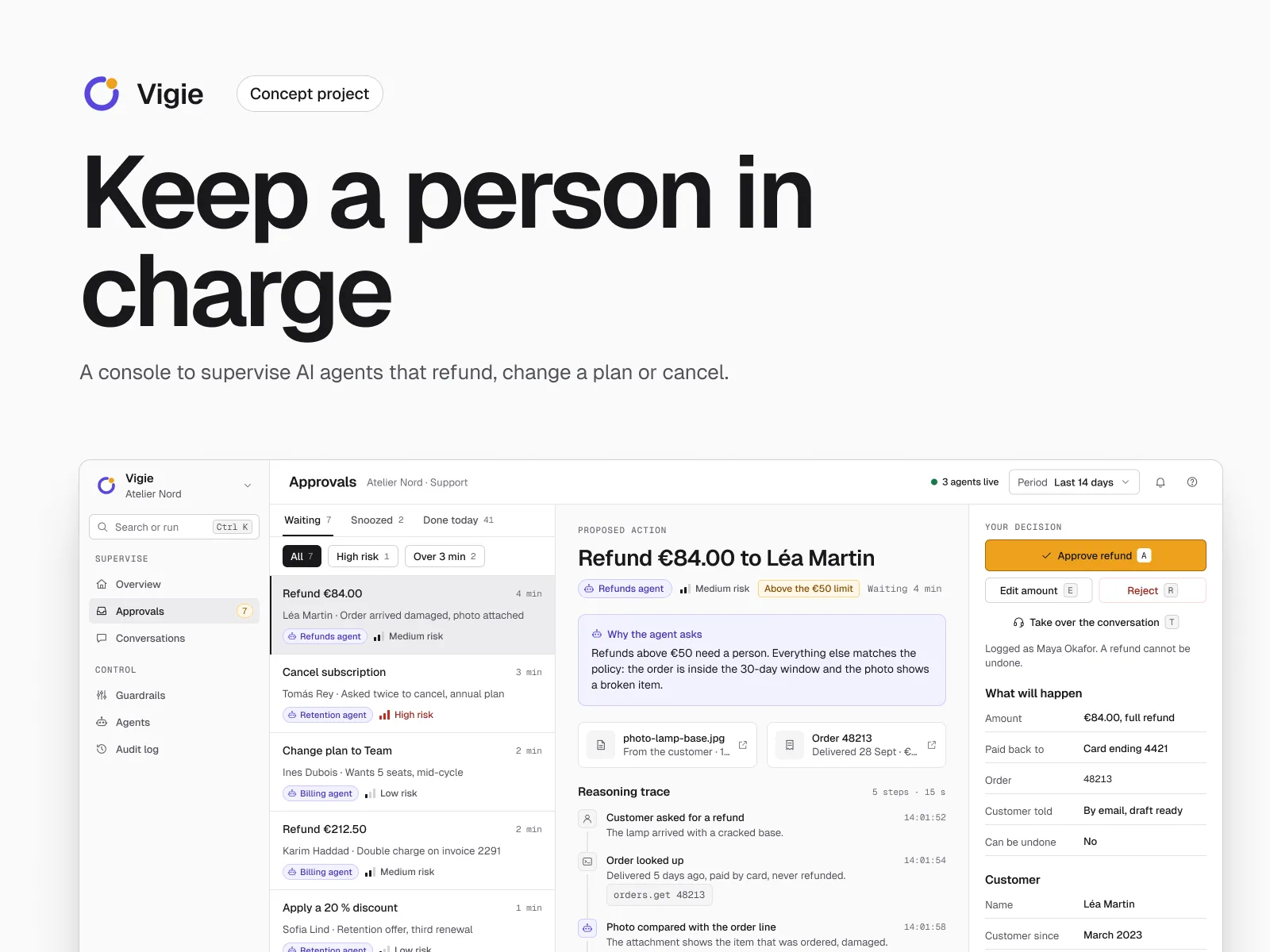
The screen. Approvals on desktop, then Queue, Approval and Approved on mobile. On the same screen: action, reason, evidence, decision. The reason sits above the button. The Approve button is amber: a person signs.
The rule. One key per decision: A, E, R, T. Ctrl K command palette, ink focus ring, 48 px targets.
The trade-off. Keeping everything on one screen makes the approval card longer. On mobile, that means a little more scrolling. I prefer that to a decision taken without the reason.
Outcome
Not measured. Metric: share of decisions whose actor is identified at first glance, time to approve on call. Collection: moderated usability test on the prototype, timed tasks, a recall question after each screen.
The weakest text pair reaches 4.7:1. Amber on white drops to 2.2:1. A 4.6:1 outline corrects it, and its meaning never rests on colour alone.
Figures counted by script in the Figma file, 4 October 2026.
What I learned
A colour rule only holds if every other use is forbidden. As soon as green means “approved”, amber loses its meaning. Autonomy does not belong to the agent, it belongs to each action, with its limit. Finally, responsibility is visible: an amber button, a reason above it, one sentence about the irreversible. That is what separates a decision from a reflex.
Two gaps are known: the test plan not run, the audit with assistive technologies not done. Those are the next steps if the project continues.
Transparency
- ClientNone. Personal project, example data.
- ResearchDesk research on dated public sources. No interviews.
- User testingTest plan written, not run.
- AccessibilityContrasts calculated pair by pair. No audit and no conformance claim.
- MethodDesigned in Figma with an AI-augmented workflow: Claude connected to Figma through MCP, directed and reviewed by the designer.
What AI did, what I decided
The AI
- Generated screen variants from the design system.
- Wrote the counting and contrast-checking scripts.
- Sped up iterations.
Me
- Framed the problem.
- Set the rule of one colour per actor.
- Chose the three autonomy levels.
- Fixed the contrasts, including the amber outline.
- Reviewed every screen.
 Next projectTiloaMulti-brand design system for a business bank